Monday, February 6, 2012

Thursday, March 31, 2011
Computer Tip: Change Blogger Size
To change the size of a Blogger or Blogspot page is a relatively simple tip.
Just one more computer tip to change the size of your Blogger page. Hope this helps.

- Click on the Design tab and then click on edit html. **Remember to backup your te3mplate just in case of a mishap.
- Scroll down to the section "Outer Wrapper". Below a line or a two will be the width size usually around 700 which you can change. I like 900.
- Scroll down a little further to "Main Wrapper". Same procedure except the original amount is around 450 since it is only the width of the post itself. Change the value and I recommend 650.
Just one more computer tip to change the size of your Blogger page. Hope this helps.
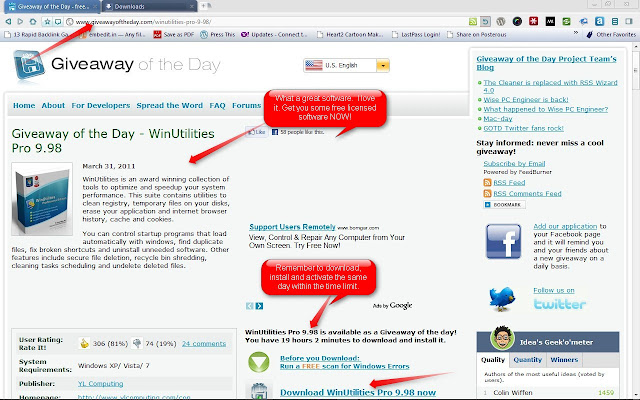
Tip: Visit Giveawayoftheday.com For Free Software
Visit Giveawayoftheday.com is the best tip I can give anyone who needs quality software but cannot afford them. Good and reliable free software is hard to find. Trying to find illegal licenses on torrent sites is dangerous for your computer health. So, start each day with a visit to Giveawayoftheday.com for free licensed software you need.
Wednesday, March 9, 2011
Computer tip: No Flashing Logo
Here is a new computer tip for those of you who just don't like seeing the Windows flashing logo when you power up your computer. Take it off and gain a couple extra seconds of speed on startup. Here is how to do it.

- Go to the start button and click.
- Go to the search box and type : msconfig
- This will open a screen with several options. Look in the bottom section for a box item labeled : no gui boot. Go ahead and check the box.
- Click on Apply
- Now restart your computer
Spy pen great tool
Spy Pen is a great product that can make it much easier to capture those odd moments for youtube or whatever.
Tuesday, February 15, 2011
Downloading Movies Online
Downloading movies online is not hard. This is a repeat but using an embed to give credit to the originl source of the document.
Thursday, February 10, 2011
Windows Help Panes Need a Tweak
Help panes for Windows and web browsers can be very accommodating for most computer users. But, sometimes they can be almost as bad as a trojan horse in your PC. Very often PC users will become so frustrated, unable to get any work done, they simply give up or resort to very desperate measures that often do not work entirely.
Why these help panes appear is beyond my scope of computer knowledge. Using the ALT-Delete works for a short period of time and then becomes locked or the windows task manager is simply overloaded with the process being repeated over and over. I have been in this situation too many times and trying to end each process line is exhausting. Twice, the help pane problem led me to rebooting my entire Windows operating system. It was in the end no help at all.
Help for this problem finally presented itself after quite a bit of web research and perseverence. Upon chance, a note was found stating that the help panes might be the result of a misfunctioning keyboard key. Help panes can be summoned using the F-1 key on many PC's and laptops so the note appeared to have some logical base. This seemed a good place to begin the war.
Fixing this problem of reoccuring help panes would need some type of software to remedy the glitch. Having a desire to help myself through the use of freeware, a little more web surfing eventually dug up a small program that seems to be just what the doctor ordered: Key Tweak.
Using Key Tweak, a keyboard remapper, was simple and appeared to solve the problem Help panes have not reappeared at random for either my windows environment or any of my browsers. The help pane problem can be resolved with Key Tweak version 2.30 on Windows NT/2000/XP/Vista/and Windows 7.
If you are experiencing this same problem, with help panes popping up in such numbers as to confound you and your PC, then seek out this freeware by simply googling Key Tweak and downloading it immediately. Install and run and hopefully it will be all the help you need to solve your problem of uncontrollable help panes on Windows.
Subscribe to:
Posts (Atom)